
Summary:
Recently, while using a TRON vanity address, I encountered a very stealthy on-chain phishing incident.
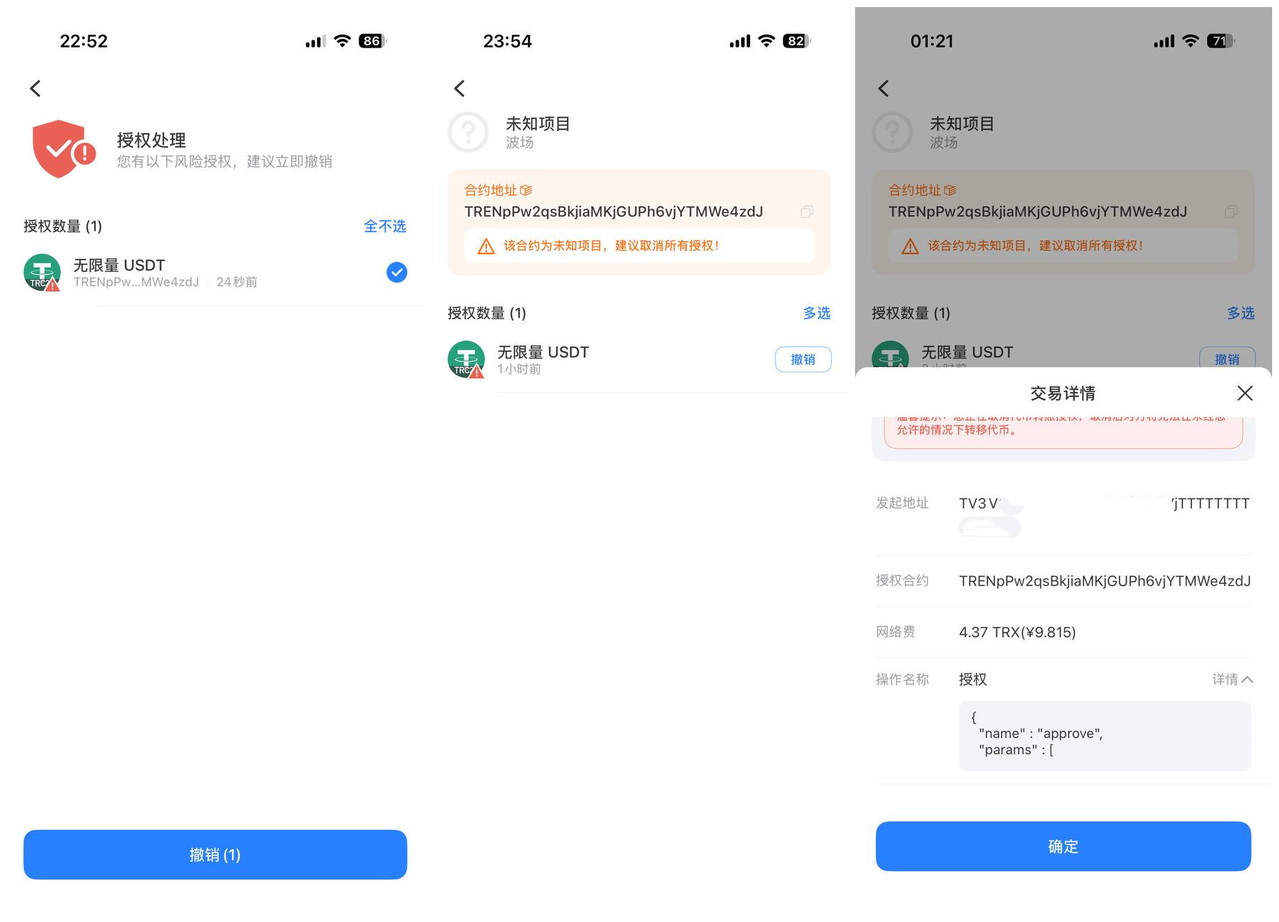
It was not a traditional "private key theft." Instead, after purchasing a vanity address, in order to change the account Owner / Active permissions to my own secure address, I used a third-party so-called "TRON multisig tool." During the process, the other party mixed a USDT approve() unlimited approval transaction into the normal multisig workflow, making it look like account permission setup.
In the end, although the real multisig permissions were successfully changed to my own address, the previously signed unlimited USDT approval remained valid long-term. Three days later, the other party used this approval to directly drain 4,303.37 USDT from the wallet without needing my signature again or my multisig private key.
What is truly dangerous is often not the transfer you can see, but the approval you once signed without understanding. Be alert when TRON vanity addresses are sold at low prices, then a one-click multisig tool is provided, and small errors appear during the multisig process.
1. How did the scammer set the trap step by step?
Many people who buy TRON vanity addresses have a normal need:
The private key of the original vanity address may have been generated by the seller, so for security, the account permissions need to be changed as soon as possible, transferring Owner Permission and Active Permission to another wallet address fully controlled by yourself.
This idea itself is not wrong.
The real problem is:
What tool do you use to complete the multisig or permission change?
At the time, I did not operate through a method I was familiar with and could fully verify the transaction contents. Instead, I used a third-party "TRON multisig website."
The whole process looked normal:
Create or activate the vanity address, connect wallet, enter your new Owner address, set account permissions, wallet pop-up confirmation, pay TRX fees...
From an ordinary user's perspective, these steps are easily understood as "operations that must be performed during multisig setup."
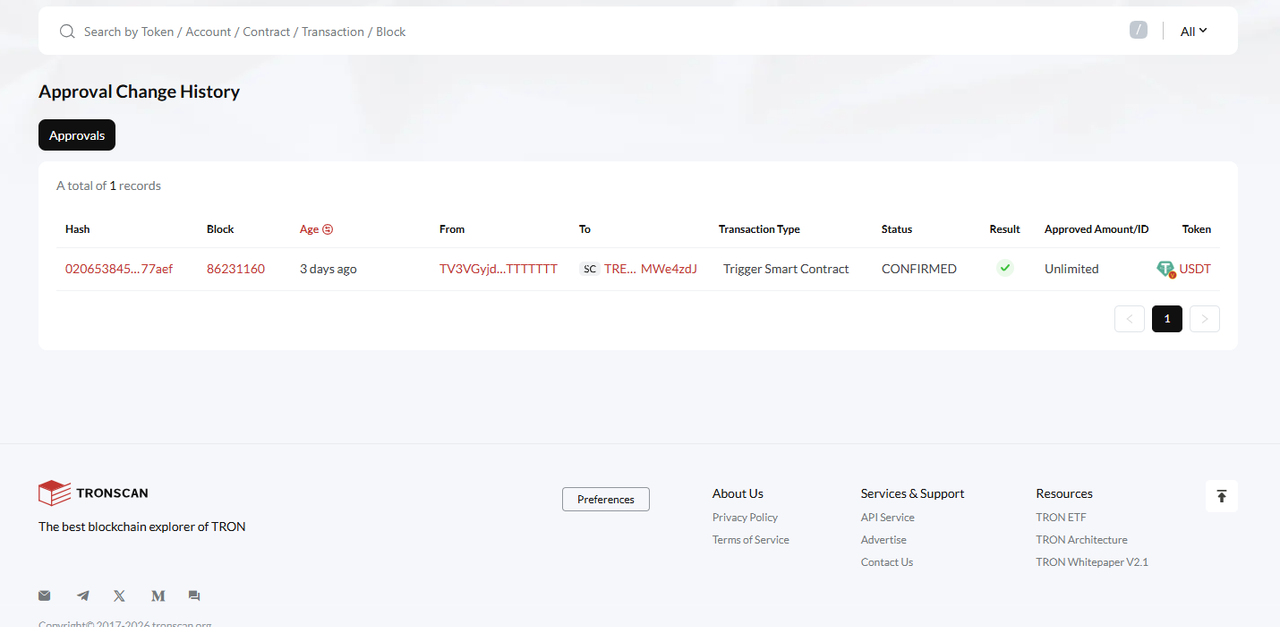
But after checking the on-chain records afterward, I discovered that before actually modifying the TRON account permissions, the third-party website had actually first made me sign another transaction of a completely different nature:
USDT approve(address spender, uint256 value) approval.
And it was not an ordinary small approval, but:
Unlimited — unlimited allowance approval.
2. The most dangerous point: the scammer does not immediately transfer your money
This is where this scam is most stealthy.
If the wallet directly popped up:
Transfer 4303 USDT
Most people would immediately become alert.
But scammers do not immediately transfer your funds.
They first induce you to sign:
Allow a certain address or smart contract to use your USDT.
This is the common TRC20 token:
approve(address spender, uint256 value)Once you confirm in the wallet, an authorization relationship is recorded inside the USDT smart contract:
Your wallet address
        ↓
Authorize a strange address / contract
        ↓
Unlimited USDT
At this point, not a single cent of your money may be missing.
The wallet balance is still normal.
The Owner permission may also be your own.
The Active permission may also have been successfully changed to your own.
Even if you later truly complete the multisig setup, this USDT approval will not be automatically cleared.
So users easily make an incorrect judgment:
"My Owner and Active have both been changed to my own addresses, so now it should be absolutely safe."
In fact, the danger had already been planted earlier in that approve authorization.
3. My actual on-chain timeline
Afterward, by checking TRONSCAN, I reconstructed the entire process.
Step one: the address was activated.
2026-09-14 05:57:57 UTC
Beijing time / Singapore time:
2026-09-14 13:57:57
An address transferred a very small amount of TRX to my TRON vanity address to activate the account.
Step two: only 1 minute 48 seconds later, unlimited USDT approval appeared.
2026-09-14 05:59:45 UTC
Beijing time / Singapore time:
2026-09-14 13:59:45
The transaction method clearly showed:
approve(address _spender, uint256 _value)TRONSCAN clearly showed:
Approved Amount: Unlimited USDTIn other words, at that time the wallet actually signed an unlimited USDT approval.
Step three: about 28 minutes 51 seconds later, the TRON account permissions were actually changed.
2026-09-14 06:28:36 UTC
Beijing time / Singapore time:
2026-09-14 14:28:36
This transaction was the real:
AccountPermissionUpdateContractFinally, the account permissions were successfully changed to addresses controlled by myself:
Owner Permission
→ my own secure address

Active Permission
→ my own secure address
On the surface, it seemed safe by this point.
But the problem was:
The previous Unlimited USDT Approval did not disappear because the Owner / Active permissions were changed.
Step four: three days later, the approval was exploited.
2026-09-17 11:11:57 UTC
Beijing time / Singapore time:
2026-09-17 19:11:57
The attacker used the previously authorized smart contract to drain from my address:
4,303.37 USDT
This transfer did not require me to confirm again in TokenPocket.
Nor did it require obtaining the private key of my later Owner address.
Because the permission to use USDT had already been mistakenly authorized by me three days earlier.
4. Why could the scammer still transfer USDT after the multisig was changed?
This is the most easily misunderstood part of the entire incident.
TRON account permissions and TRC20 token approvals are not the same thing.
In a TRON account:
Owner Permission
Active Permission
These control which addresses sign for this TRON account and which addresses can execute the corresponding account operations.
But USDT's:
approve
allowance
These are a separate authorization state stored inside the USDT smart contract.
Here is a simple example.
Suppose you initially use wallet A to sign:
USDT.approve(
    malicious contract,
    Unlimited
)
Then you change the TRON account's Owner permission to wallet B.
This does not mean:
USDT allowance = 0The token approval that already existed may still remain valid.
So you must remember:
Completing multisig ≠ clearing USDT approval.
5. Why are "TRON vanity addresses + multisig" especially prone to phishing scenarios?
Because people who buy vanity addresses usually already know a basic security principle:
The private key of the original vanity address cannot be used directly long-term; the Owner / Active permissions need to be changed.
Therefore users naturally search online for:
- TRON multisig tools
- TRON multisig websites
- Secure rebinding for vanity addresses
- Owner permission modification
- Active permission setup
- TRON permission management
This gives phishing websites an excellent opportunity.
Because when users enter such websites, they are already mentally prepared for:
"Next, the wallet will ask me to sign transactions."
So when the wallet continuously pops up smart contract confirmation pages, it is easy to mistakenly think:
All of these are steps that must be completed for multisig setup.
But in fact, the core transaction for truly modifying TRON Owner / Active permissions should be:
AccountPermissionUpdateContractIf the so-called "multisig process" suddenly contains the following:
approve
increaseAllowance
transferFrom
USDT Approval
Unlimited
Trigger Smart Contract
Especially if this appears:
Unlimited USDT
You should stop immediately.
Because setting TRON Owner / Active permissions has no reason at all to require you to give a strange address or strange contract unlimited USDT usage rights.
6. The correct security approach after purchasing a TRON vanity address
After purchasing a vanity address, do not immediately deposit a large amount of USDT into the address.
It is recommended to proceed in the following order.
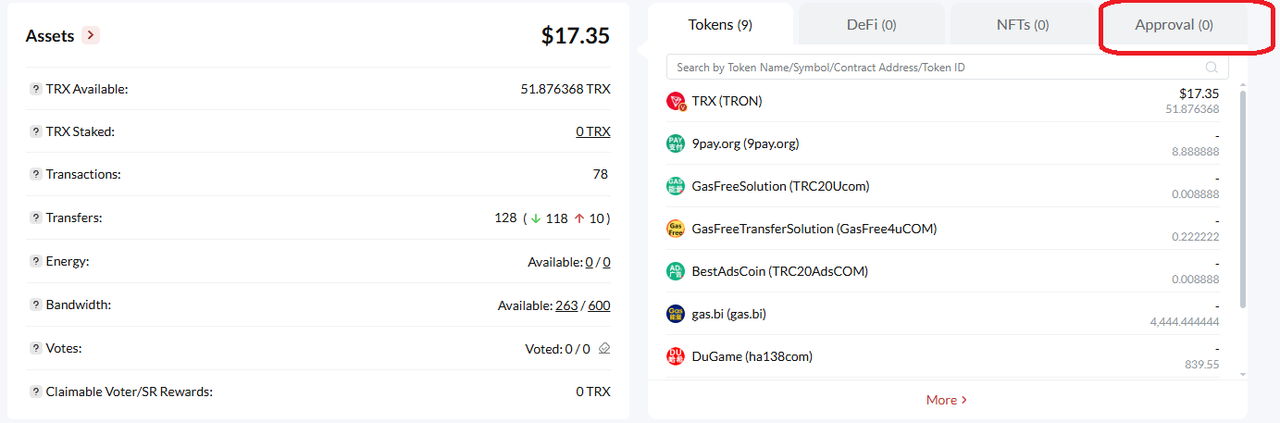
1. First confirm the original address status
Check the address on TRONSCAN:
- Owner Permission
- Active Permission
- Historical transactions
- Approval
- Approval Change History
Confirm that the address does not have any abnormal approvals left over from before.
2. Modify Owner / Active permissions
When modifying permissions, focus on confirming the transaction type popped up by the wallet.
When truly modifying account permissions, you should see a transaction related to:
AccountPermissionUpdateContractRather than:
USDT approve()3. Check Approval again after modifying permissions
This point is very important.
Do not assume that because Owner has been changed to your own, you can safely deposit funds.
You should also recheck:
- USDT approvals
- USDC approvals
- Other TRC20 Token approvals
- Approval Change History
Confirm that no strange address has obtained:
Unlimited approval.4. Only then transfer in large funds
Only after completing:
Owner check
+
Active check
+
Approval check
+
Historical transaction check
should you consider transferring USDT and other assets into the new address.
7. When you see these contents while signing, you must be highly alert
From now on, whether it is TokenPocket, TronLink, or any other wallet, as long as you see the following keywords during the so-called "multisig setup" process, do not directly click confirm:
approve
approve(address,uint256)
increaseAllowance
transferFrom
permit
Unlimited
USDT Approval
Trigger Smart Contract
Especially:
Unlimited / unlimited approval
You must stop and confirm:
- Who is being authorized?
- Why is authorization needed?
- Why does setting up multisig require touching USDT?
- What is this spender address?
- What is this smart contract?
If it cannot be explained clearly, cancel directly.
8. Do not mistake "disconnecting the DApp" for "revoking approval"
Wallets often have:
- Disconnect website
- Cancel DApp connection
- Delete browsing history
- Remove wallet connection
These operations are not the same as an on-chain USDT Approve.
If a:
approve()has already been confirmed and written to the blockchain, then:
Closing the webpage, deleting browser history, and disconnecting the TokenPocket DApp connection usually will not automatically clear it.
To truly revoke the approval, you need to send another on-chain transaction to set:
allowanceback to: 0
and wait for on-chain confirmation.
9. Security checklist after completing multisig
It is recommended that all TRON vanity address and multisig wallet users check item by item before depositing funds:
- Check Owner Permission: whether all are addresses controlled by yourself.
- Check Active Permission: whether any strange addresses exist.
- Check Threshold: whether the threshold matches your design.
- Check Weight: whether the weight of each authorized address is correct.
- Check USDT Approval: whether any strange spender exists.
- Check Unlimited: whether any unlimited allowance approval exists.
- Check Approval Change History: whether there are historical approvals you do not remember.
- Check Trigger Smart Contract: whether any strange smart contract was called during multisig.
- Check recent transactions: whether there are unexplainable on-chain operations.
- Only after confirming everything is normal, proceed with large deposits.
10. What should you do if you have already used a suspicious multisig website?
If you have ever used a strange third-party multisig website, do not only check the wallet's current balance.
You should immediately check:
- TRONSCAN's Approval
- Approval Change History
- Owner Permission
- Active Permission
- Trigger Smart Contract history
- USDT / USDC and other TRC20 Token approvals
If you find a strange:
Unlimited USDTyou should immediately revoke the approval.
Before confirming that the on-chain allowance has returned to zero, do not continue transferring USDT into this address.
If the same Owner address, Active address, or other wallets have also connected to this suspicious website, they should also undergo security checks together.
11. The biggest lesson this incident taught me
In the past, when many people judged whether a wallet was safe, the first things they thought of were:
- Has the mnemonic phrase leaked?
- Has the private key leaked?
- Has the phone been infected?
But this experience made me truly realize:
Even if the private key has not leaked, funds can still be transferred away by others.
Because you may have personally signed an approve() for the other party.
Scammers do not even need to act immediately.
They can wait days, weeks, or even longer.
Waiting until you believe the address is already "safe," then depositing enough USDT into it.
Once the balance reaches an amount worth acting on, they use the previously obtained approval to drain it all at once.
12. Final security reminder
Buying a TRON vanity address itself does not necessarily mean there is a problem.
TRON's Owner / Active permission mechanism itself is also a normal account security feature.
What is truly dangerous is:
Using an untrustworthy third-party website to modify multisig permissions, and being tricked into signing a malicious unlimited USDT approval during the normal permission modification process.
So in the future, when buying TRON vanity addresses, setting up multisig, or modifying account permissions, be sure to remember:
Before changing Owner, check the signature first; after changing Owner, check the approvals.
When setting up multisig, if USDT approve suddenly appears, especially Unlimited unlimited approval, cancel immediately. They will disguise it; it may not prompt these terms, but may appear as some small error.
Do not assume that because the wallet does not immediately lose money, this signature has no risk.
Some approvals will not immediately steal your money.
They simply open the door first, then wait for you to put the money in.
I hope my experience this time can remind more friends who are buying TRON vanity addresses, using TokenPocket, TronLink, multisig wallets, or third-party TRON tools, to avoid falling into the same pit.
If you find this article helpful, it is also recommended to forward it to friends around you who use TRON, USDT-TRC20, or multisig wallets.