
This product is a Telegram one-month-old high-weight finished account registered with a US virtual phone number, with codes retrieved through a high-cost API interface. All accounts have successfully passed the official high-risk control period and have higher compliance weight and anti-ban durability than newly registered accounts. Full format support (compatible with Telegram Desktop and mobile clients), eliminating the cumbersome process of preparing an overseas phone number yourself and waiting for code retrieval. Specially created for cross-border e-commerce, overseas traffic generation teams, and compliance testers who have clear requirements for account region and pursue time-saving and worry-free solutions.
🚀 Core selling points of US-region Telegram one-month-old accounts
- High-weight one-month-old account: Has safely passed the sensitive period. Compared with instant-use new accounts on the market that get banned immediately, risk-control tolerance is multiplied.
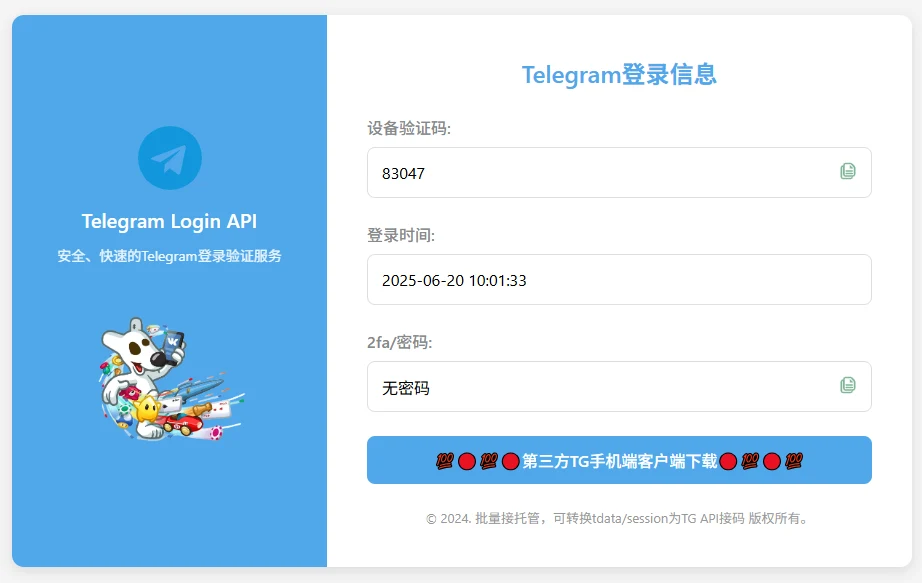
- Self-service web-based code retrieval: Exclusive API extraction channel. Open the delivery link at any time to refresh in real time and obtain the verification code and 2FA password.
- Authentic US-region environment: Registered with a high-quality exclusive US number range, perfectly suited for high-requirement legitimate scenarios such as overseas cross-border traffic generation and business mass messaging.
I. Standard login and code retrieval process for US-region TG accounts
- Initiate request: Open the Telegram client (Telegram Desktop is recommended first, and the official mobile client can also be used), enter the US phone number provided in the delivery, and click to send the verification code.
- Open link: Open the web-based code retrieval link included in the delivery information in a browser.
- Retrieve verification code: After the client successfully sends it, refresh the webpage to view the Telegram login verification code in real time.
- Enter 2FA password: If the system prompts for a two-step verification password, copy and enter the 2FA password (cloud password) shown on the code retrieval webpage to log in successfully.
- Security hardening (strongly recommended): After the first successful login, immediately go to settings to **change the 2FA two-step verification password** and **bind a personal security email** to ensure the account remains exclusively yours permanently.
II. Security maintenance and prohibited uses
- Restrained network environment: For login and later use, be sure to maintain a **clean, stable, exclusive network proxy**. Do not frequently switch country IPs within a short period of time.
- Strictly prohibited违规 marketing: Newly logged-in devices have a 48-hour inspection period. During this period, do not send high-frequency mass advertisements, frantically add people to groups in bulk, or frequently modify profile information, etc.
- Ban on illegal uses: This product is strictly prohibited for all malicious fraud, harassment,违规 traffic generation, or any behavior that violates local laws and regulations and Telegram platform rules.
III. After-sales contract and troubleshooting for special abnormal risk control (required reading)
🕵️♂️ Common severe risk control caused by buyer's local IP contamination and practical countermeasures:
- Abnormal phenomenon 1: After the client prompts for the phone number to log in, it directly prompts to bind an email or enter an email verification code?
Reason: This means the network proxy you are currently using (public node/data center IP) has been blacklisted by the official side, triggering interception protection. **Solution:** Immediately disconnect, **switch to a clean, exclusive overseas native static IP**, clear the client cache, or **use a third-party client (such as the official Telegram X / portable desktop version)** to try again, and you can successfully bypass this determination. - Abnormal phenomenon 2: After entering the number, it prompts that you need to pay for Telegram Premium to receive the verification code?
Reason: Because the public node environment used by many people has been used for malicious mass messaging, the official side has restricted it. **This is not a problem with the account itself.** Please immediately purify your local network environment, use a clean and pure node, or switch to the official portable desktop version for the first login.
🛡️ After-sales guarantee agreement:
- This product is a virtual account asset. After delivery, **the first login verification success is guaranteed**. Once you successfully log in and enter the interface, the order is considered fully delivered.
- If the buyer insists on using a poor-quality free data center network, submits verification codes repeatedly at high frequency within a short time, causing the number to be temporarily rate-limited by the system, or fails to properly nurture the account after login, resulting in an immediate ban and disconnection, it is not covered by after-sales service.
Frequently Asked Questions
Q1: What is the delivery format for purchasing a US Telegram full-month account? How do you retrieve the verification code?
A: The system uses fully automatic delivery, in the format: mobile phone number --- web-based code receiving link. You only need to copy this exclusive link and open it in a browser to view in real time the five-digit verification code required for login and the two-factor authentication (2FA) cloud password included with the account.
Q2: What is a "Full Moon account"? What significant advantages does it have compared to a regular account?
A: A full-moon account refers to a Telegram high-weight aged account that has been registered for more than 30 days and has successfully survived. Because it already has an established registration history record in the official servers, its high weight and ability to resist risk controls for various mass messaging, traffic diversion, and cross-border device logins are far stronger than ordinary new accounts that are instantly banned.
Q3: What should I do if the web-based code-receiving link won't open or the login verification code isn't displayed in it?
A: Please follow a strict logical sequence: you must first enter the phone number in the Telegram client and click Next. After the official server sends the login broadcast to that number, then refresh the code-receiving webpage, and the verification code will sync immediately. If there is a delay due to network fluctuations, please wait 10 seconds and click again. Do not click repeatedly at high frequency.
Q4: After logging in, can I still change my password or bind my own exclusive email?
A: This is highly recommended! After logging in successfully, please go to the client's Settings -> Privacy and Security -> Two-Step Verification as soon as possible to change it to your own exclusive password, and configure a long-term secure recovery email. This will ensure that this ready-made account is completely yours exclusively from then on.
Q5: I am a complete beginner who doesn't know how to bypass internet restrictions at all. Is this kind of high-authority account suitable for me to buy?
A: Absolutely not suitable. Telegram is a strictly blocked overseas platform. If your local network cannot even connect to its official relays, buying an account with high weight and durability will still show a network connection failure. Please make sure you have a stable, clean overseas static dedicated proxy network before placing an order.