This product is a high-quality, ready-to-use Telegram account registered with a native Japanese +81 number via a high-cost API interface for SMS reception. Japanese numbers possess excellent localization attributes for cross-border high-end business, Sino-foreign trade communication, overseas precision marketing, and refined project operations. Due to strict registration thresholds, they hold an exceptionally favorable trust rating on official servers. The account has completed basic compliant registration and security screening, supports login on both mobile and desktop clients, saving you the hassle of the cumbersome SMS-receiving and account creation process. Ready to use upon purchase, it is the stable and durable top choice for cross-border e-commerce, overseas marketing, and compliant technical testing.
💎 Core Advantages of Japan Region +81 Telegram Ready-Made Accounts
- Native Japanese High Authority: Authentic +81 regional attribute, with an extremely high risk-control rating on official servers, perfectly suited for stringent overseas legitimate business scenarios.
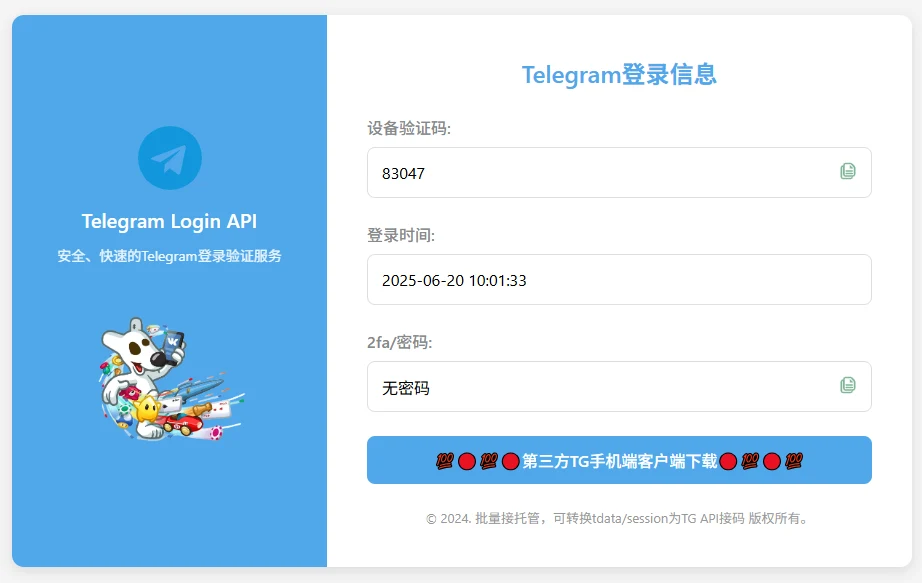
- Fully Automated API Web SMS Reception: Independent 24/7 dedicated query channel. A simple browser refresh instantly syncs the 5-digit dynamic login code and 2FA password in real-time.
- Supports Future Security Maintenance: After successful login and passing the new environment sensitive period, buyers can fully manage and modify their avatar, username, bio, and personal recovery email.
I. Standard Login and Security Hardening Process for Japan Region TG Accounts
- Initiate Login: Open your Telegram client (the official portable version of Telegram Desktop for PC is highly recommended; the official mobile app is also acceptable), select the country code
+81, enter the provided Japanese mobile number, and click send verification code. - Access Link: Once the client prompts that the code has been sent, open your order's dedicated webpage API SMS-receiving link in a browser.
- Retrieve Code: Refresh the SMS-receiving page to retrieve the real-time synced 5-digit verification code and enter it correctly into the client.
- Enter Cloud Password: If prompted for two-step verification, copy and enter the 2FA password (cloud password) displayed on the SMS-receiving webpage to log in instantly.
- Lock Down Permissions (Critical Defense): Immediately after the first successful login, go to Telegram Settings:
Settings -> Privacy and Security -> Two-Step Verification, **change the 2FA password** and **bind your personal, frequently used recovery email**. The original SMS-receiving link will automatically become invalid.
II. Daily Account Maintenance Precautions and Prohibited Use Disclaimer
- Clean Proxy Network: Must configure a **stable, clean, uncontaminated dedicated overseas proxy node** (a dedicated static residential IP is recommended). Strictly avoid frequently switching IPs between countries or regions within a short period.
- New Device Sensitive Period: For the first 48 hours on a new device, maintain normal idle browsing. Strictly avoid high-frequency mass messaging, aggressive bulk group joining, or mass inviting users within a short time to prevent triggering mechanisms that flag the environment as abnormal.
- Prohibited Illegal Use: This product is strictly prohibited for any malicious fraud, spam advertising, illegal marketing, or any other use that violates laws, regulations, or Telegram's official community guidelines.
III. After-Sales Agreement and Special Anomaly Risk Control Troubleshooting (Must Read)
🕵️♂️ Common Official Interception Risk Controls Triggered by Buyer's Local Network Pollution and Practical Countermeasures:
- Anomaly 1: After entering the Japanese number, the client forces email binding or prompts for an email verification code?
Cause: The proxy IP currently used by the buyer's computer/phone (e.g., public airport nodes, free tools) has been blacklisted and contaminated by official systems, triggering platform interception defenses. **Solution:** Immediately disconnect the current network, **switch to a clean, dedicated overseas native static IP**, and completely clear the client cache. Alternatively, **try logging in via another official client (e.g., Telegram X)** to often bypass this type of interception successfully. - Anomaly 2: The client interface prompts payment for Telegram Premium to receive SMS verification codes?
Cause: This indicates the shared node environment has been heavily abused by mass black-hat devices, and official systems have imposed punitive anti-abuse defenses on this IP. **This is definitely not an underlying issue with the ready-made account itself.** Immediately clean up your local proxy network environment and use a clean, dedicated static node for the first login attempt.
🛡️ After-Sales Guarantee Agreement:
- This product is a virtual digital asset. We guarantee **successful first login verification** after delivery. Once you successfully enter the Telegram system interface and see the main chat list, the order is considered complete and perfectly delivered.
- Issues arising from the buyer using severely contaminated proxy IPs, submitting repeated verification requests at extremely high frequency within a short period, or engaging in rule-violating mass messaging after login leading to official account restrictions are not covered under the after-sales guarantee.
Frequently Asked Questions
Q1: What is the delivery format for purchasing Japanese Telegram ready-made accounts? How can I self-service retrieve the login code?
A: System fully automatic delivery, format: Japanese mobile number --- web API code-receiving link. Buyers simply open the link in their browser to self-service refresh and retrieve the 5-digit dynamic verification code required for login, as well as the 2FA two-step verification password (cloud password) that comes with the account at the factory.
Q2: What are the notable advantages of Japanese +81 number segments compared to numbers from other regions?
A: Japanese +81 mobile numbers are renowned in the industry for their "extremely strict risk control and high acquisition costs," but this also grants them an exceptionally high initial rating from Telegram's official servers. In multi-platform matrix operations and cross-border enterprise customer service integration, their stability and resistance to bans far surpass those of conventional niche countries and low-barrier number segments.
Q3: Why is the webpage for the shipping verification code link blank or not updating with a new code?
A: Web API code reception follows a strict logical sequence: you must first correctly enter the number in the official Telegram client and send a login request, triggering the official server to broadcast the code to that number. Only after that, when you refresh the webpage, can it sync in real time. If you encounter network delays, wait 10 seconds before refreshing—do not click repeatedly at high frequency.
Q4: After logging in successfully, is it safe for me to change my password or bind my own dedicated email?
A: Extremely secure, and it is strongly recommended that you change it immediately! After logging in, promptly modify your 2FA two-step verification password and configure your personal private recovery email. This will sever the original code-receiving webpage's control over the account at the server level, ensuring that from this moment on, the account assets are 100% exclusively yours.
Q5: Buying a finished account from the Japanese region—does that mean it's 100% safe and will never get banned no matter how you use it?
A: No tool in the world is absolutely immune to account bans. The ready-made accounts we provide offer high-quality initial standing and convenient SMS verification, but if you insist on logging in through unclean proxy networks after purchase, or engage in relentless high-frequency ad bombardment without any warm-up, or aggressively join groups in bulk triggering numerous user reports, the platform may still flag you for spam marketing and impose rate limits or bans. Please use the accounts safely, in a compliant and reasonable manner.